Learn Morse Code with
Raspberry Pi

A fun, hands-on project where kids use mouse clicks to type Morse code, see it light up on an LED matrix, and hear it read aloud β€” built with the help of AI.

πŸš€ Get Started ⭐ View on GitHub

🎬 See It in Action

✨ What This Project Does

πŸ–±οΈ

Mouse-Based Input

Short click for a dot, long press for a dash. It's that simple. Kids pick it up in seconds.

πŸ’‘

LED Matrix Display

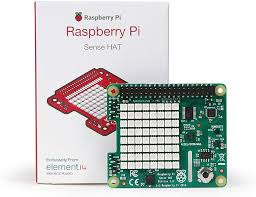
Each decoded letter lights up on the Sense HAT's 8Γ—8 LED grid in bright colours.

πŸ”Š

Audio Feedback

Beeps for dots and dashes, text-to-speech reads the full message, and a Mario tune celebrates completion.

⌨️

Keyboard Mode

Toggle to keyboard mode with TAB β€” type regular text and hear it converted to Morse code audio.

πŸ–₯️

Fullscreen Display

A clean pygame interface shows the current Morse input, decoded characters, and complete words in real time.

πŸ€–

Built with AI

Developed using Amazon Kiro, an AI-powered IDE β€” showing how AI can help students build real projects.

πŸ“‹ Quick Overview

🎯 Who is this for?

Students, hobbyists, and anyone curious about electronics, coding, and communication history. No prior experience needed.

🧠 What will you learn?

Morse code, Python programming, hardware interfacing, threading, audio synthesis, and how to use AI as a development partner.

Raspberry Pi board

Raspberry Pi β€” the brain of the project

Sense HAT with LED matrix

Sense HAT β€” the 8Γ—8 LED display

πŸ—ΊοΈ Explore the Project